
Introduction to Notes
Notes are an integral part of Dataverse tables. They are used to store notes linked to any record e.g. an account or a contact. Some out-of-the-box tables come with attachments enabled, which in turn enables notes and files. For custom tables, there is an option to enable attachments.

Notes in model-driven apps
Notes show up under Timeline (along with other activities) in model-driven apps. To learn how to add and configure the timeline control, click here.

Working with a note
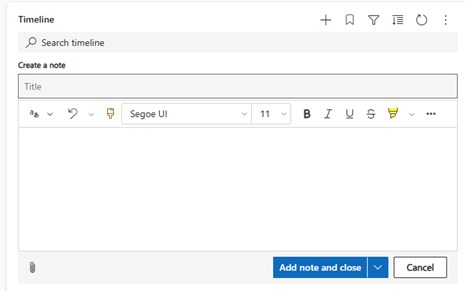
To create a note, follow these steps:
- Click on the + icon in the Timeline

Step 1 for note creation - Select Note
- Enter your note and click on Save

Step 2 for note creation - To edit a note, click on the edit/pencil icon and to delete a note, click on the delete/trash icon
- You can also add an attachment to a note

As you can see, working with notes is super easy in a model-driven app. We will review if it is easy to work with notes in a canvas app!
3 thoughts on “How to work with Dataverse Notes in model-driven apps”